The equalizer that lives in your menu bar.
EQBar is a native Mac app with a system-wide equalizer, AutoEQ headphone correction, spatial audio, per-app volume and Audio Unit plugins. It idles at about 10 MB and needs no audio driver.
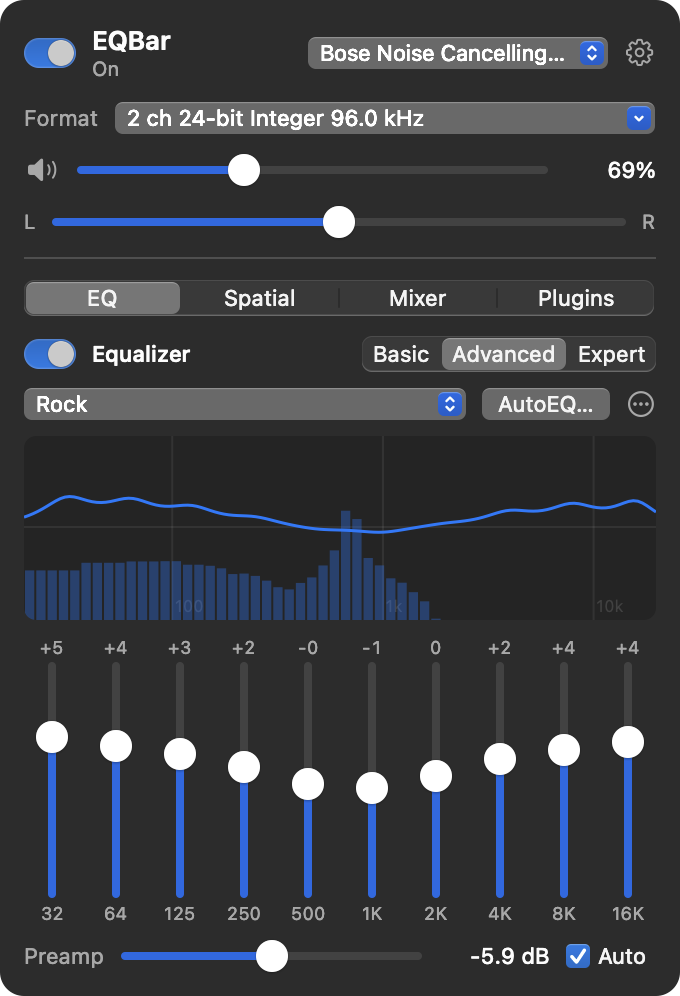
Everything sits in one menu
The full eqMac Pro feature set, rebuilt as a native AppKit app. Click the icon, adjust, and get back to what you were doing.
Equalizer
Basic, 10-band Advanced, or Expert with parametric bands, drawn over a live spectrum analyzer.
AutoEQ
Search the AutoEq project's headphone measurements and apply a correction in one click.
Spatial audio
Stereo on two virtual speakers inside a simulated room, rendered by Apple's spatial audio engine.
Per-app volume
Every app that plays sound gets its own level and mute, from silent up to a boost.
Audio Unit plugins
Run any installed Audio Unit effect at the front of the chain and open its own editor.
Volume keys
Your keyboard's volume keys boost past the Mac's maximum and work on HDMI displays.
Output format
Pick each device's sample rate and bit depth from the menu, as in Audio MIDI Setup.
Crossfeed and width
bs2b crossfeed for easier headphone listening, plus a mid/side stereo width control.
Three ways to shape the sound
Start with bass, mid and treble, move to a 10-band graphic EQ, or go fully parametric. Try it here: pick a preset or drag the bands.
The curve uses the same RBJ biquad maths EQBar runs on your audio, with Q 1.41 per graphic band.
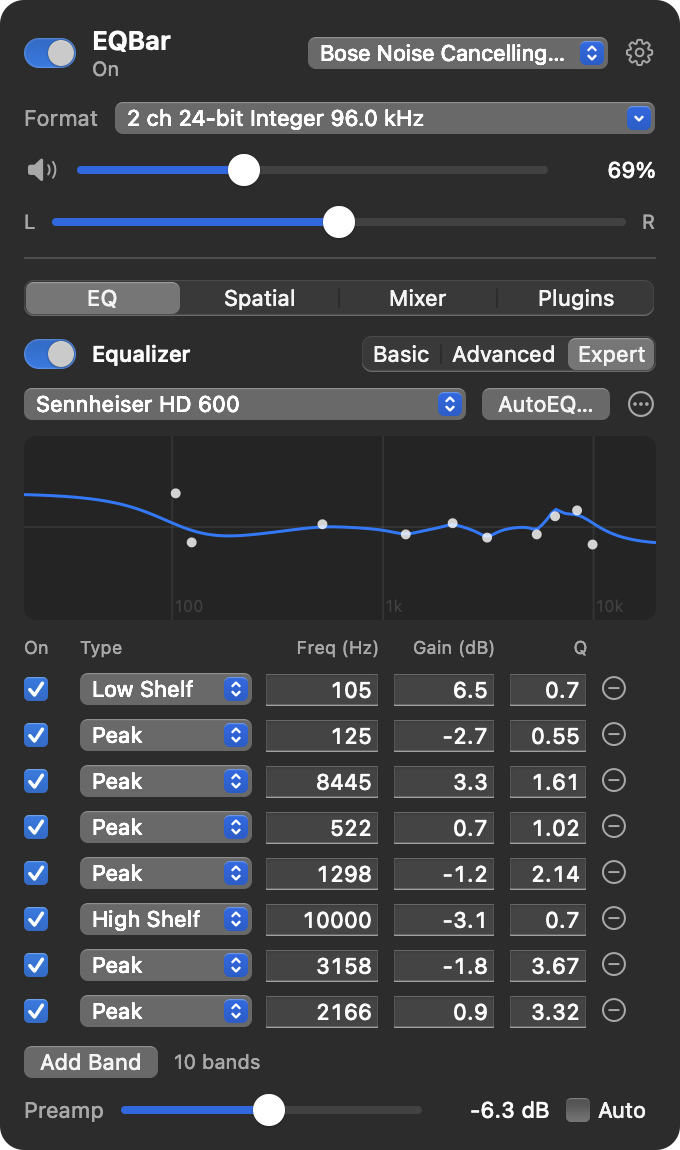 Expert mode with an AutoEQ profile loaded
Bass, mid and treble
Two shelves and a peak for quick, safe changes.
10-band graphic
32 Hz to 16 kHz with 18 built-in presets and your own.
Up to 64 parametric bands
Seven filter types. Imports EqualizerAPO text and eqMac presets.
Search your headphones, apply the fix
EQBar searches the AutoEq project's measurements by model, downloads the parametric correction and loads it as an Expert preset you can still adjust.
Profiles come from AutoEq by Jaakko Pasanen (MIT). The index is fetched when you first search and cached for a week.
Speakers in a room, on your headphones
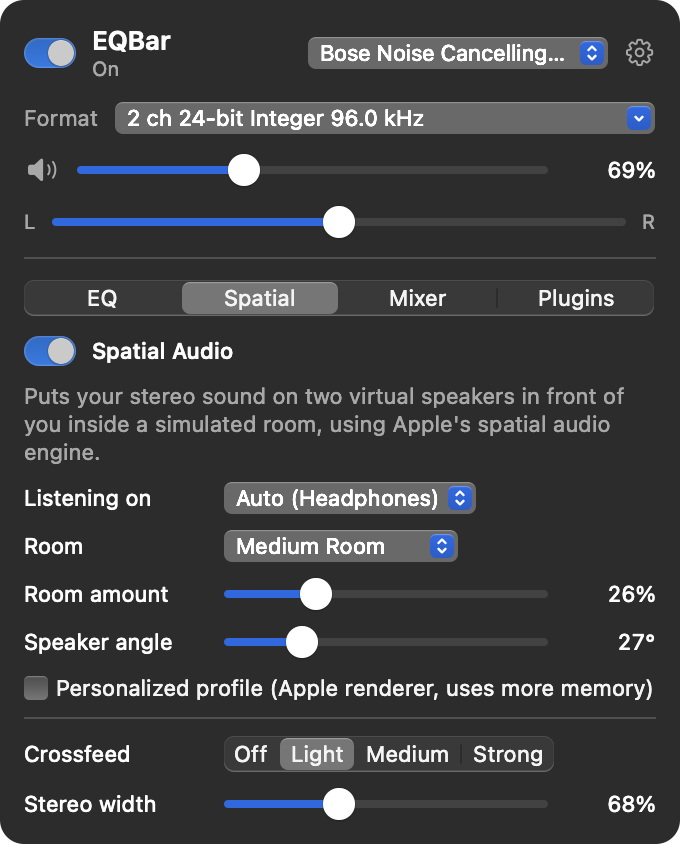
EQBar places your stereo on two virtual speakers in front of you, inside a simulated room, using Apple's AUSpatialMixer.
- Headphones get Apple's high-quality HRTF renderer
- Speakers use equal-power panning
- 13 rooms, from a small room to a cathedral
- Crossfeed and stereo width on the same page
- Detects headphones on its own, with an optional personalized profile
A level for every app, and your own effects
Turn the video call down without touching your music, and put any Audio Unit effect in front of the EQ.
Per-app volume
Apps appear while they play sound. Drag a level, or go past the line to boost.
Audio Unit effects
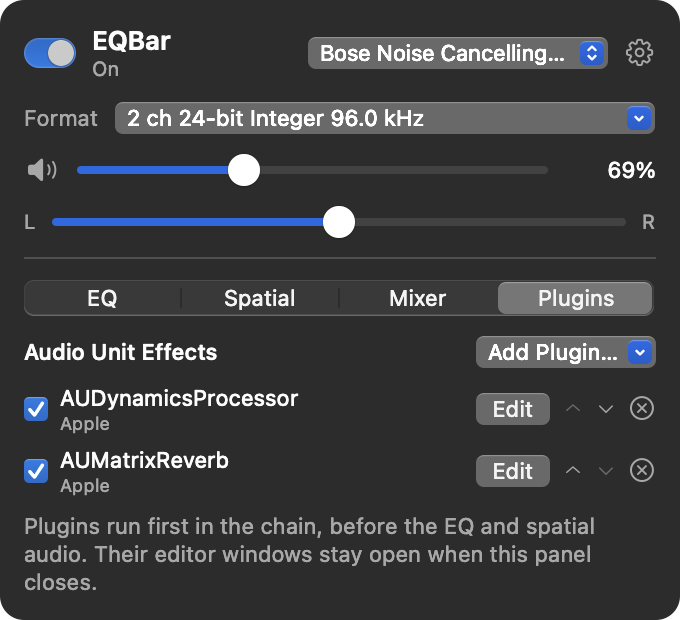
Add compressors, reverbs or room correction from any vendor. They run first, before the EQ and spatial audio.
- AUv2 and AUv3 effects from every installed vendor
- Open the editor in its own window
- Bypass and reorder with one click
- Settings are saved with each plugin
Louder than 100%, at the format you choose
EQBar's volume is your Mac's volume. Past the top, the keys keep going with a clean boost.
Volume keys with boost
Press the keys below. Up to 100% they set the Mac's own volume, above it EQBar adds up to +12 dB. On HDMI and DisplayPort outputs that macOS can't adjust, EQBar sets the level itself.
Output format
The same sample rate and bit depth choices as Audio MIDI Setup, one click from the menu bar. Click a format to try it.
Example list. Each device shows the formats it supports.
Built on Core Audio process taps
macOS 14.4 added process taps, a public API for capturing what apps play. EQBar taps the system mix, mutes the original, runs it through its signal chain and plays it on your output. Nothing to install in the system.
- Your apps play as usual
- ↓
- Process tapcaptures the mix, mutes the original
- ↓
- Preampheadroom for boosts
- Pluginsyour Audio Units
- Equalizerup to 64 bands
- SpatialHRTF and rooms
- Crossfeedbs2b
- Stereo widthmid/side
- Volumeboost to +12 dB
- Limiterstops clipping
- ↓
- Your outputheadphones, speakers, HDMI
Small enough to forget it's running
Measured on an Apple M4 Pro at 96 kHz. Memory is the footprint Activity Monitor shows.
Memory by scenario
From EQBar's built-in test run that drives every feature in turn.
What's left out
Everything EQBar doesn't carry is memory and CPU you keep.
Two permissions, both explained
Your audio is processed on your Mac. Nothing is recorded or uploaded, and there's no account, analytics or telemetry.
System Audio Recording
Lets EQBar tap the sound your Mac plays so it can process it. macOS asks on first launch.
Accessibility
Only used to see the volume and mute keys. EQBar ignores every other key. Turn volume keys off and it isn't needed.
Network
Used only when you search AutoEQ, to download the profile index and the profile you pick from GitHub.
~/Library/Application Support/EQBar/settings.json. Settings › Permissions shows both permissions and opens the right page.Up and running in a minute
A universal app for macOS 14.4 or later on Apple silicon and Intel. Download the release, or build it yourself with only the Command Line Tools.
- Download EQBar-1.0.0.zip from the latest release and unzip it.
- Move EQBar.app to your Applications folder.
- Open it. The app isn't notarized yet, so macOS asks once:
- macOS 15 and later: System Settings › Privacy & Security › Open Anyway
- macOS 14: Control-click the app, choose Open, then Open again
- Or run
xattr -dr com.apple.quarantine /Applications/EQBar.app
- Allow System Audio Recording, and Accessibility if you want the volume keys.
Swift Package Manager only, no Xcode project. scripts/test.sh runs the DSP, parser and render tests.
Built on great work by others
EQBar is open source under the Apache License 2.0, and it wouldn't exist without these projects.
eqMac
EQBar is inspired by eqMac and rebuilds its feature set, Pro features included, as a lean native app. It reads eqMac's exported presets too. Thank you, Roman.
AutoEq
Headphone measurements and correction profiles.
Jaakko Pasanen · MITbs2b
The crossfeed design used for headphones.
Boris MikhaylovAudio EQ Cookbook
The biquad filter formulas behind every band.
Robert Bristow-JohnsonAUSpatialMixer
Apple's spatial renderer, used for HRTF and rooms.
Part of macOSGive your Mac better sound
Free, open source and about a megabyte. Made by ZephyrSai.